

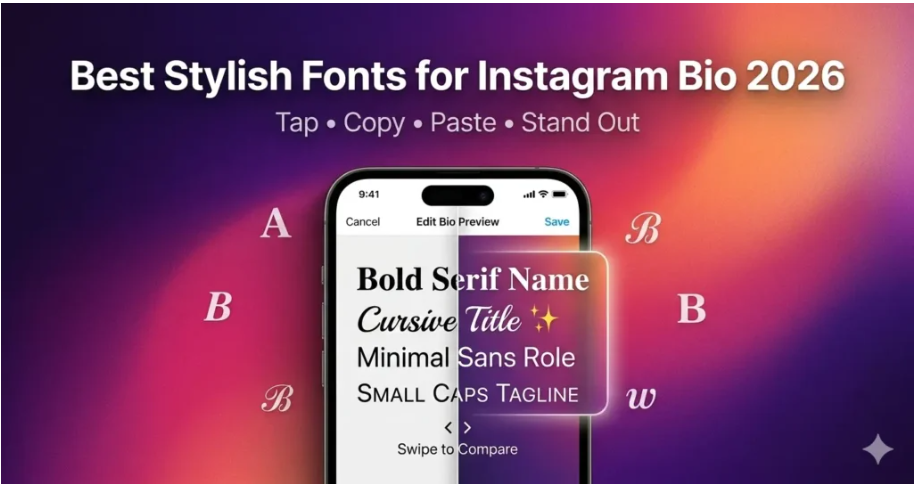
Why Your Instagram Bio Font Actually Matters {#why-it-matters}
Think about the last time you landed on someone’s Instagram profile and immediately felt like this person gets it. Chances are, their bio wasn’t just well-written — it looked the part too.
Your Instagram bio is prime real estate. You get 150 characters to tell the world who you are, what you do, and why someone should hit that Follow button. Most people spend hours picking the right words — and then leave them in plain, default text.
That’s a missed opportunity.
Using Letras Bonitas for your Instagram bio is one of the simplest ways to:
Create a visual identity that feels intentional and polished
Break up text so it’s easier to scan at a glance
Signal personality — whether that’s playful, elegant, bold, or aesthetic
Make your profile look distinct in a sea of sameness
And the best part? You don’t need Photoshop, design experience, or a paid subscription. You just need the right font generator.
What Are Fancy Fonts for Instagram? {#what-are-fancy-fonts}
Here’s something most people don’t realize: Instagram doesn’t support custom fonts natively. You can’t change the font in your bio settings the way you would in a Word document.
So how do those stylish bios happen?
They use Unicode characters — a universal text encoding system that includes thousands of special characters that look like stylized letters but are technically just text symbols. When you paste them into your Instagram bio, Instagram reads them as regular text and displays them styled.
This is why they work everywhere — iOS, Android, desktop — without any app permissions or workarounds.
Some popular Unicode-based font styles you’ll see on Instagram include:
Each has its own personality and use case — which brings us to the next section.
Top Font Styles That Work Best on Instagram in 2026 {#top-font-styles}
Not every font style fits every niche. Here’s a breakdown of what works where:
Cursive & Script Fonts
Best for: Lifestyle bloggers, wellness creators, poets, personal brands
Cursive fonts feel warm and personal. They work beautifully for bios that lead with emotion — “𝒍𝒊𝒗𝒊𝒏𝒈 𝒔𝒍𝒐𝒘𝒍𝒚 & 𝒊𝒏𝒕𝒆𝒏𝒕𝒊𝒐𝒏𝒂𝒍𝒍𝒚” hits differently than “living slowly & intentionally.”
Aesthetic / Fullwidth Fonts
Best for: Fashion accounts, art pages, K-pop fans, aesthetic feeds
The spaced-out fullwidth style (aesthetic) feels editorial and cool. It’s particularly popular among creators who curate a specific visual mood across their feed.
Bold & Serif Fonts
Best for: Coaches, entrepreneurs, motivational pages, business profiles
Bold fonts command attention. If your bio includes a value proposition or call-to-action — “𝗛𝗲𝗹𝗽𝗶𝗻𝗴 𝗰𝗿𝗲𝗮𝘁𝗼𝗿𝘀 𝗴𝗿𝗼𝘄 𝗼𝗻𝗹𝗶𝗻𝗲” — bold serif makes it land harder.
Bubble Fonts
Best for: Gaming accounts, meme pages, fun/casual creators
Bubble text is playful and immediately eye-catching. Use sparingly — a full bio in bubble text can feel overwhelming, but a key phrase or username styled this way pops nicely.
ꜱᴍᴀʟʟ ᴄᴀᴘs
Best for: Minimalist profiles, photographers, editorial accounts
Small caps feel refined without being showy. They add structure to a bio without making it feel loud — great for creators who let their content do the talking.
How to Add Stylish Fonts to Your Instagram Bio (Step-by-Step) {#how-to-add}
Getting fancy fonts into your Instagram bio takes about 60 seconds once you know the process:
Step 1: Choose your text Decide which part of your bio you want to stylize. This could be your name, your tagline, your niche descriptor, or a call-to-action.
Step 2: Open a font generator Head to a tool like Letras para Instagram — it generates dozens of Unicode font styles from any text you type, instantly and for free.
Step 3: Type your text Enter your words into the generator. You’ll see a live preview of every available font style side by side.
Step 4: Copy your chosen style Tap “Copy” next to the style you like.
Step 5: Paste into Instagram Open Instagram → Go to your profile → Tap “Edit Profile” → Paste the copied text into your bio or name field → Save.
That’s it. No app downloads, no subscriptions, no technical knowledge required.
Best Tools to Generate Instagram Fonts for Free {#best-tools}
There are quite a few font generators out there, but quality varies a lot. Here’s what to look for in a good one:
Wide variety of styles — at least 20–30 different font options
One-click copy — no fumbling around selecting text manually
Mobile-friendly interface — since most Instagram editing happens on phone
Unicode compatibility — so the text actually works across all devices
No registration required — you shouldn’t need an account just to copy a font
Letras para Instagram checks all of these boxes. It’s clean, fast, and offers a broad range of styles from aesthetic and cursive to glitch and bubble — all generated in real time as you type.
If you also want to explore a broader library of stylized character sets — not just for Instagram but for any platform — Letras Diferentes is worth bookmarking. It covers hundreds of different Unicode font categories, making it one of the most comprehensive free tools available for text customization.
Fonts for Instagram Captions vs. Bio — What’s the Difference? {#captions-vs-bio}
Both your bio and captions support Unicode font characters, but the strategy is different.
In your bio: Your bio is permanent (until you change it), so choose fonts that represent your brand identity consistently. Stick to one or two complementary styles — don’t mix five different fonts in 150 characters.
In captions: Captions are more flexible. You can use stylized fonts for:
Highlighting key phrases (“This is 𝒆𝒙𝒂𝒄𝒕𝒍𝒚 what I mean”)
Adding visual rhythm to longer text
Making your first line (the hook) visually distinct before the “more” cutoff
Seasonal or thematic styling for specific posts
One thing to keep in mind: screen readers and accessibility tools don’t always interpret Unicode characters as intended. If accessibility is important for your audience, use stylized fonts decoratively rather than for essential information.
Common Mistakes People Make With Instagram Fonts {#common-mistakes}
Even a great font can backfire if used wrong. Here are the pitfalls to avoid:
1. Using too many styles at once A bio that cycles through cursive → bold → bubble → glitch in four lines looks chaotic, not creative. Pick a primary style and stick to it.
2. Sacrificing readability for aesthetics Some glitch or Zalgo-style fonts look striking in screenshots but are genuinely hard to read. If your bio communicates important information (your niche, your CTA, your link context), make sure people can actually read it.
3. Using font styles that clash with your feed vibe If your Instagram feed is dark, moody, and cinematic — and then your bio is in pink bubble text — there’s a disconnect. Your bio font should feel like part of the same brand world as your visual content.
4. Forgetting mobile preview Always check how your bio looks on mobile after editing. What looks balanced on desktop can feel cramped or oddly spaced on a phone screen.
5. Never updating it Your bio font, like your bio copy, should evolve with your brand. If you started with a casual bubble font in 2022 and you’re now a serious professional brand, it might be time for an upgrade.
People Also Ask {#people-also-ask}
Can I use fancy fonts in my Instagram username?
Yes and no. Instagram usernames only support letters, numbers, periods, and underscores — no Unicode characters. However, your display name (the bold name that appears above your bio) does support Unicode fonts, so that’s where most people add stylized text.
Will fancy fonts affect my Instagram SEO or discoverability?
Potentially, yes. Instagram’s search algorithm reads text to understand what your profile is about. If your entire bio is in Unicode characters, the algorithm may have trouble parsing keywords. Best practice: keep your primary keywords in standard text and use fancy fonts for decorative elements around them.
Are these fonts safe to use on Instagram? Will my account get flagged?
Yes, they are completely safe. Unicode characters are part of the standard text encoding system — you’re not using any exploit or third-party app integration. Millions of accounts use them without any issues.
Do fancy Instagram fonts work on all devices?
The vast majority of Unicode characters display correctly on all modern iOS and Android devices. Some very obscure characters may show as blank boxes on older operating systems, which is why it’s worth testing on a couple of devices before committing to a style.
What is the best free tool to generate Instagram fonts?
Tools like Letras para Instagram are among the most reliable — they offer a wide range of styles, instant preview, and one-click copy with no login required. For even more variety, Letras Diferentes gives you access to an extensive library of Unicode text styles across categories.
Can I use fancy fonts in Instagram Stories or Reels?
Not directly as Unicode text — Instagram Stories and Reels have their own built-in text tools with native font options. Unicode font tricks apply specifically to text fields like your bio, display name, and post captions.
How do I make my Instagram bio look aesthetic?
Start with a clean structure: one line for your identity/niche, one for your value or personality, one for social proof or location, and one for your CTA or link. Then apply a consistent font style (cursive or aesthetic fullwidth tend to work best for the “aesthetic” look), add relevant emojis sparingly, and use line breaks to create visual breathing room.
Final Thoughts {#final-thoughts}
Your Instagram bio is often the first thing someone reads before deciding whether to follow you. It deserves the same attention you give to your photos, your captions, and your content strategy.
Fancy fonts are a small change with a surprisingly big visual impact. They don’t replace good writing — but they make good writing look even better.
The key is to choose styles that feel authentic to your brand, use them consistently, and keep readability front and center. One well-chosen font style, applied thoughtfully, will always beat five clashing styles competing for attention.
If you’re ready to try it out, tools like Letras para Instagram make the whole process effortless — just type, preview, copy, and paste. It takes less than a minute and your bio will never look the same again.
